




Integrations
Send a welcome or thank-you email on qualification
Automatically enrol new qualified contacts into a nurture sequence.
When someone on your team qualifies a new contact during a Cradle call, this HubSpot workflow drops that contact straight into your welcome or nurture sequence. Use it to send an introductory email, share case studies, or kick off any other onboarding touchpoints without manual data entry.
For a refresher on the properties Cradle writes into HubSpot, see List of Cradle properties.
Cradle properties you'll use
- User that created this contact from within Cradle
- Create Date
Build the workflow
In HubSpot, go to Automation → Workflows → Create workflow → Contact-based.
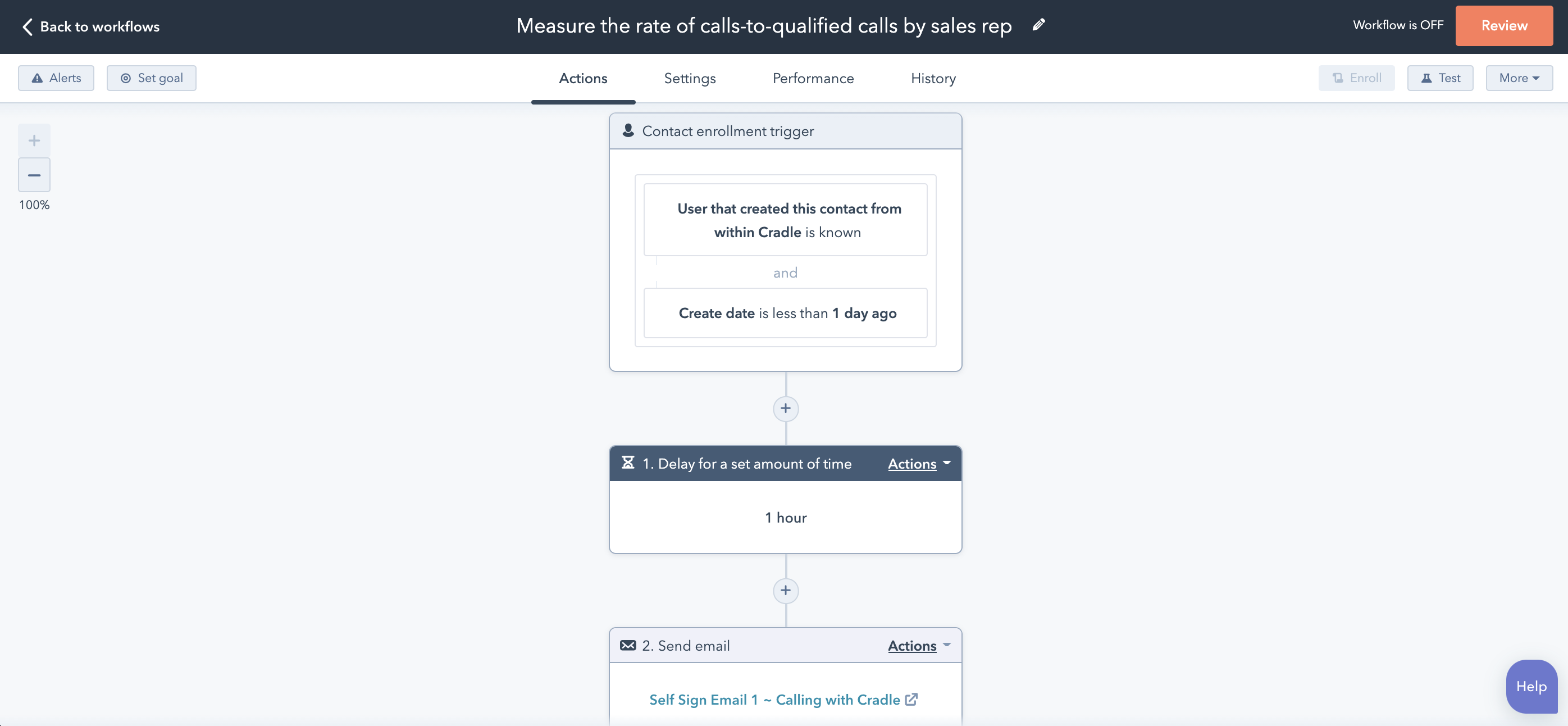
Add two enrolment triggers (combined with AND):
- User that created this contact from within Cradle is known
- Create Date is less than 1 day ago
The example below uses a 1-hour delay before the email goes out so the contact doesn't feel immediately spammed, but you can set this to whatever timing fits your team.
Choose your follow-up action
Add a Send email action and pick the marketing email you'd like to send. You can also chain additional steps here, such as adding the contact to a list, assigning an owner, or queueing further nurture emails.
Re-enrolment
You don't need to enable re-enrolment for this workflow. The Create Date is less than 1 day ago condition means each contact only ever qualifies once.
Save the workflow, turn it on, and create a test contact from inside Cradle to confirm the email lands.